Word Counter
The #1 online tool to count words, characters, sentences, paragraphs and more.
Analyze your text instantly, improve your writing, and create content that ranks and resonates.
Words: 0Characters: 0Characters (No Spaces): 0Sentences: 0Paragraphs: 0Lines: 0
0 / 100,000 Words
Text Statistics
What is a Word Counter?
Whether you're a student racing to hit a 1,500-word essay requirement, a marketer squeezing a meta description into 155 characters, a novelist tracking daily output, or a speaker fitting a script into a 10-minute slot, one question comes up constantly: "How many words is this?"
Guessing doesn't work. Counting by hand is out of the question. And your word processor buries its statistics in menus. A dedicated word counter solves this in one second, and the best ones tell you far more than a single number.
This guide covers everything: what a word counter is, exactly how words are counted (including the edge cases that cause different tools to disagree), how to use one step by step, proven frameworks for hitting strict limits, and how the free Word Counter compares to every alternative.
Quick Answer
A word counter is a free online tool that instantly counts the words, characters, sentences, and paragraphs in any text you type, paste, or upload. To use one, add your text in the word counter above, and the totals update live as you write, with no sign-up, no download, and no limits. Beyond basic counts, the tool also shows reading time, speaking time, syllables, keyword density, and readability scores, with all processing done privately inside your browser.
At a glance:
Core counts: Words, characters (with and without spaces), sentences, paragraphs, lines, and syllables, all updated in real time.
Time estimates: Reading time (~238 words/minute) and speaking time (~130 words/minute).
Quality metrics: Flesch Reading Ease, Flesch-Kincaid Grade Level, keyword density, average and longest word length.
Extras: Canadian spelling check, case converter, SEO meta-length checks, file upload/download, autosave.
Cost & privacy: 100% free, no account, and your text never leaves your browser.
What Is a Word Counter?
A word counter is an online text-analysis tool that measures the length and structure of your writing. At its simplest, you paste text and it tells you how many words and characters it contains. Modern word counters go much further: they break your text into sentences and paragraphs, estimate how long it takes to read silently or deliver aloud, calculate how often each keyword appears, and score how easy your writing is to understand.
People reach for a dedicated tool instead of the counter buried inside a word processor for two reasons: speed and focus. You don't want to open a heavy application and dig through menus just to check whether your Instagram caption fits. A browser-based word counter loads in a second, updates with every keystroke, and shows every metric on one screen.
A word counter is helpful when you need to:
Meet an assignment's minimum or maximum length
Fit copy into a platform's character limit before scheduling
Plan a speech, video script, or podcast episode by runtime
Track daily progress on a story, thesis, or book
Compare a draft against an editorial brief or content plan
Find words repeated too frequently
Check whether paragraphs and sentences are balanced and scannable
Verify title tags and meta descriptions won't be truncated in search results
In short, a word counter turns a vague sense of "is this long enough?" into precise, actionable numbers.
How Does a Word Counter Actually Count Words?
Understanding the counting rules matters, because it explains why two tools can occasionally disagree by a word or two, and how to avoid surprises at submission time.
The rule: word counter treats every uninterrupted run of characters between spaces, tabs, or line breaks as one word.
Consider this sentence:
Good writing starts with a clear idea.
Measurement | Result |
|---|---|
Words | 7 |
Characters (with spaces) | 38 |
Characters (without spaces) | 32 |
Sentences | 1 |
Paragraphs | 1 |
Punctuation attached to a word does not create another word. The period after idea adds to the character count, but idea. remains one word.
What counts as one word? (Edge-case reference table)
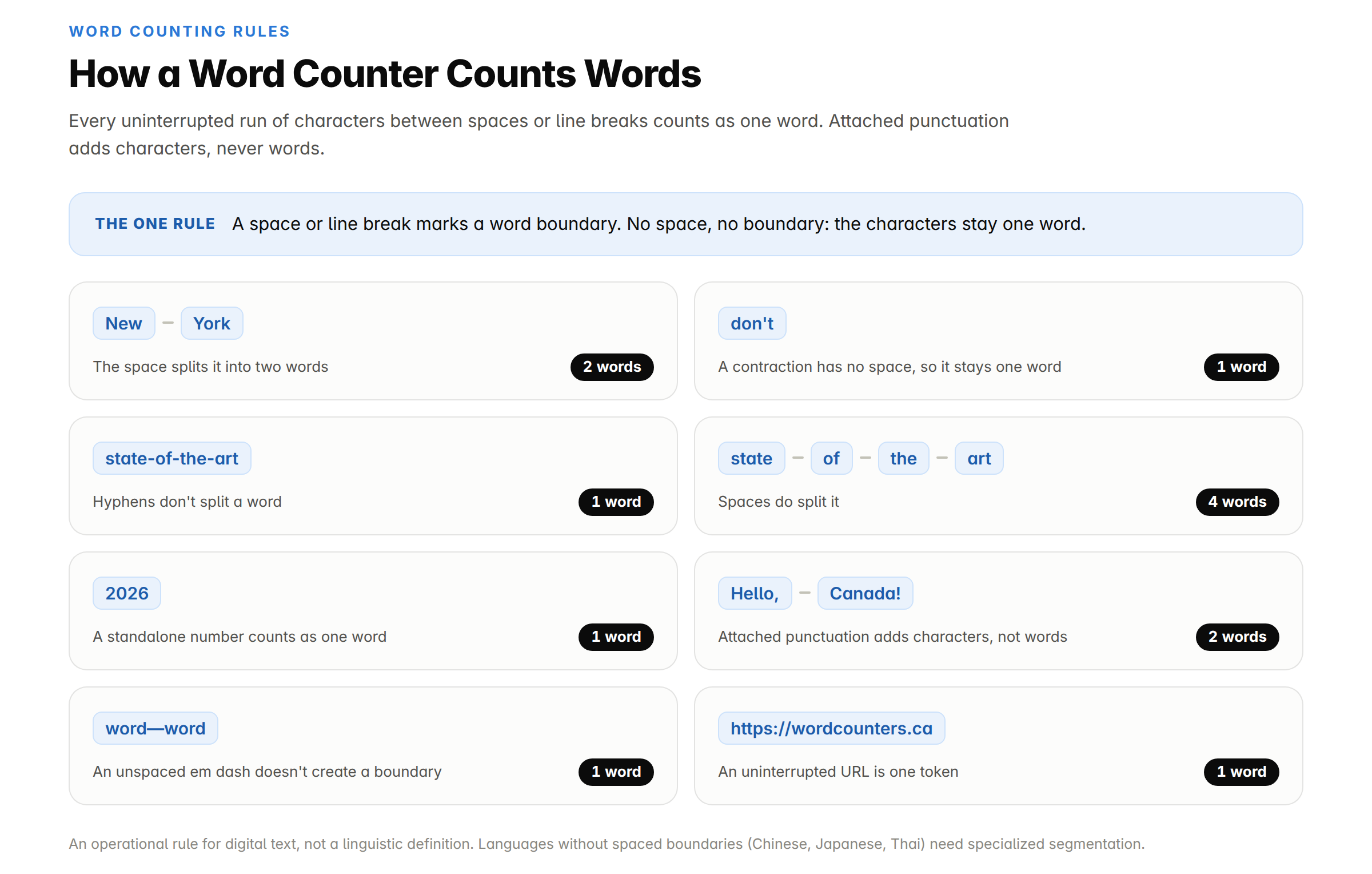
This is an operational rule for measuring digital text, not a universal linguistic definition of a word.
Why some languages need different counting methods
Whitespace-based counting works well for languages that separate words with spaces, such as English and French. Some writing systems, including Chinese, Japanese, Thai, and Lao, do not consistently mark word boundaries this way and may require specialized segmentation rules. The Unicode text-segmentation standard explains why software can legitimately use different definitions of a word boundary.
Golden rule: when a school, publisher, translation client, or submission portal provides its own count, that result is the final authority.
Why Word Count Matters: Common Limits at a Glance
Word count isn't an arbitrary metric; it's a requirement baked into almost every kind of writing. Miss these limits and the consequences are real: application portals cut you off mid-sentence, Google truncates your meta description with an ellipsis, and professors dock marks for essays that run short.
Context | Typical limit |
|---|---|
College application essay (Common App) | 650 words |
Standard academic essay | 500–5,000 words |
Research paper abstract | 150–300 words |
SEO blog post (competitive topics) | 1,000–2,500+ words |
Google title tag | 50–60 characters |
Meta description | 155–160 characters |
X (Twitter) post | 280 characters |
Instagram caption | 2,200 characters |
LinkedIn post | 3,000 characters |
Google Ads headline / description | 30 / 90 characters |
SMS message (before splitting) | 160 characters |
Press release | 400–600 words |
Adult novel manuscript | 70,000–100,000 words |
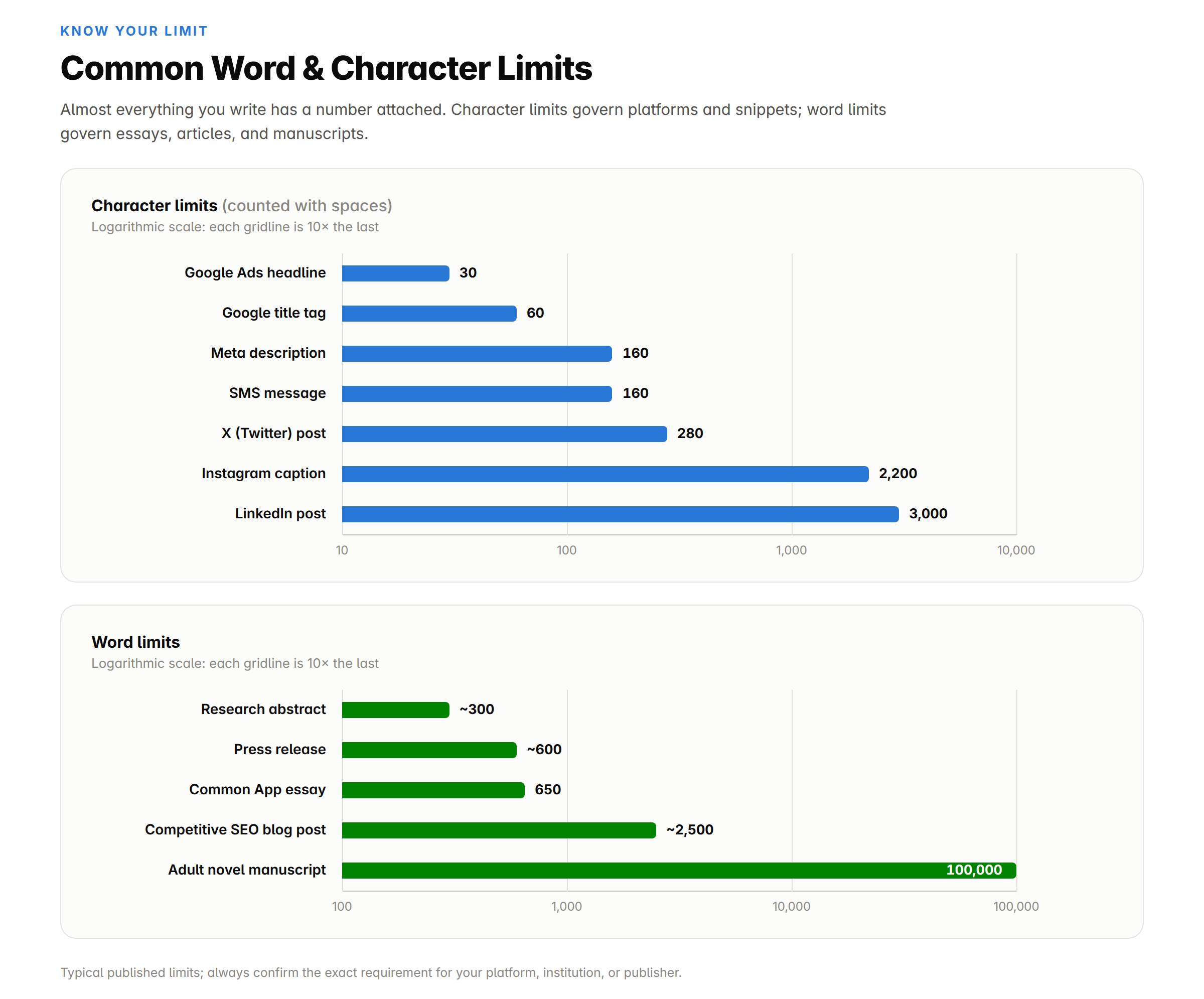
Note that some limits are words, others are characters with spaces, and a few (translation billing, some publishing contexts) use characters without spaces. Confirm which metric your requirement uses before you start trimming; a good word counter shows all three at once.
Key Features of this Word Counter Tool
Not all word counters are equal. A basic one gives you two numbers; a great one gives you a complete writing dashboard. Here's what the free tool at WordCounters.ca includes and why each feature matters in practice.
Core counting
Real-time counting as you type. Totals update with every keystroke. There's no submit button and no page reload. When you're writing toward a strict limit, you see the effect of every edit instantly.
Characters with and without spaces. Social platforms and search snippets count spaces; some translation billing and database fields don't. Both figures display simultaneously, so you never have to convert.
Sentence, paragraph, and line totals. These reveal the shape of your writing, not just its length. A 1,000-word article in three paragraphs reads very differently from one divided into ten focused sections. Long, dense paragraphs signal content that's hard to scan; a 60-word sentence is a readability problem regardless of total length.
Capacity for long documents. The editor supports drafts of up to 100,000 words, enough for essays, dissertations, scripts, and full-length manuscripts.
Time estimates
Reading time. A large meta-analysis of 190 studies found adults read English non-fiction at roughly 238 words per minute on average (fiction: ~260 wpm). The tool converts your word count into an estimated silent reading time, perfect for "5 min read" labels on blog posts and for judging whether your "quick update" email is actually quick.
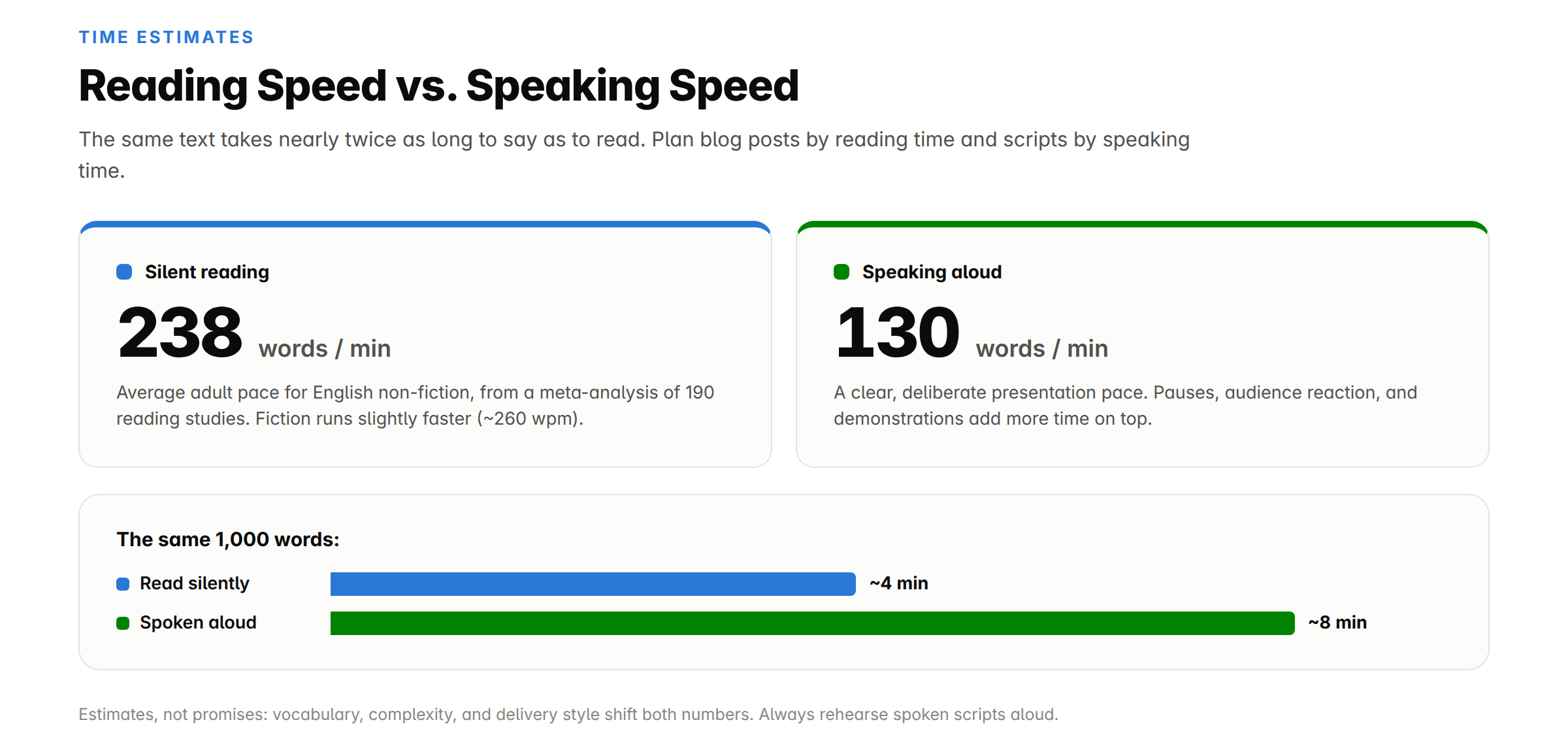
Speaking time. Calculated at approximately 130 words per minute, the pace of a clear, natural presentation. If you've ever been told "prepare a 5-minute talk," this answers exactly how many words that is (about 650). Essential for speeches, YouTube scripts, and podcast segments.
Quality and readability metrics
Readability scores (Flesch Reading Ease & Flesch-Kincaid Grade Level). These industry-standard formulas estimate how easy your text is to read and what school grade level it corresponds to. Most web content performs best at Grade 7–9 (a Flesch Reading Ease of roughly 60–70). Treat the score as a warning signal, not a final grade; it can't measure accuracy, originality, or argument quality.
Syllable analysis. Supports readability calculations, poetry, lyrics, and language learning. English syllables are hard for software to identify perfectly, so treat automated totals as estimates where pronunciation matters.
Average and longest word length. Average word length hints at how technical a passage feels; the longest-word statistic surfaces terms that might need explanation or replacement.
Keyword density. How often a word or phrase appears as a percentage of total words:
Keyword density = keyword uses ÷ total words × 100
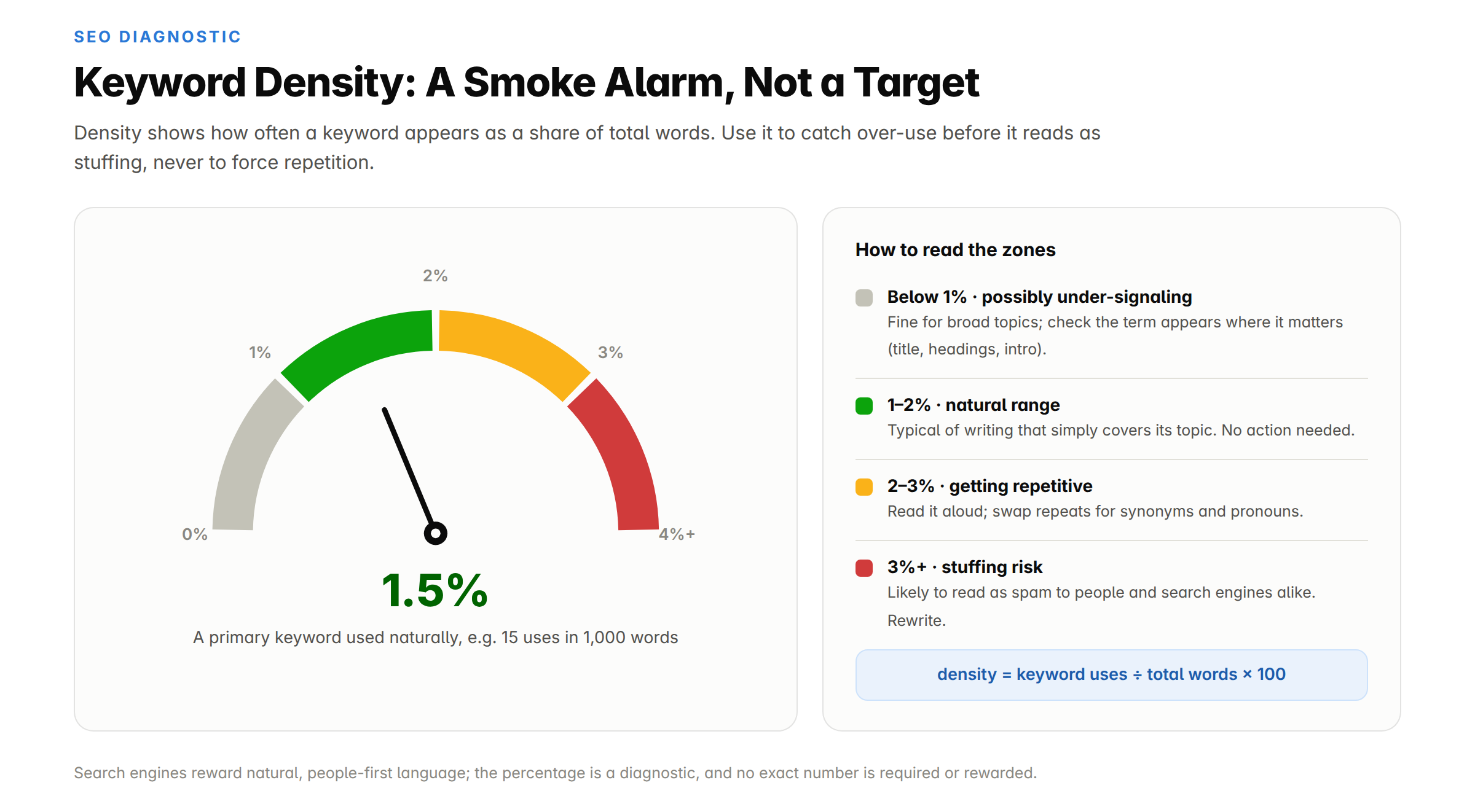
If a keyword appears twice in a 100-word paragraph, its density is 2%. Use this to catch accidental repetition, not to force a keyword toward an arbitrary percentage. Google's guidance rewards helpful, people-first content, not keyword formulas.
SEO and formatting helpers
SEO meta checkers. Built-in title tag and meta description length checks confirm your snippets fit Google's display window (~50–60 and ~155–160 characters respectively), so search listings never get cut off with an awkward "…".
Case converter. Switch text between UPPERCASE, lowercase, Title Case, and Sentence case in one click, handy for fixing headings or Caps Lock accidents.
Canadian spelling support. A standout feature: the spelling scan flags American variants (color, center, labor) so Canadian students, businesses, government writers, and publishers can keep consistent colour-style spelling.
Rich-text formatting. Heading, paragraph, and font controls let you organize a draft without switching to another editor. Formatting never changes the word count unless you change the actual text.
Workflow and privacy
Upload, download, copy, paste, clear. Load a text file directly, analyze it, edit in place, and export the result. Each takes one click.
Autosave. Your draft is preserved locally in your browser, so an accidental tab close doesn't wipe your work. Use the clear control when you want to remove the saved draft.
Privacy-first, in-browser processing. All counting and analysis run in your browser using JavaScript. Your text is never uploaded, stored, or transmitted to a server, which matters enormously for confidential documents, unpublished manuscripts, and client work. Even so, avoid pasting passwords or highly sensitive identification details into any online editor.
Free, no account, no limits. No sign-up, no word cap, no premium tier gating the useful features. Beyond the main counter, Word Counters offers 36 free tools, including a dedicated Character Counter, Sentence Counter, Keyword Density Checker, Readability Checker, and Speaking Time Calculator, so related tasks stay on one site.
How to Use the Word Counter (Step by Step)
Using the tool takes under ten seconds:
Open the tool. Go to Word Counter page in any browser on desktop, tablet, or phone. Nothing to install, no account to create.
Add your text. Type directly in the editor, paste from any document or web page, or upload a file with the Upload button.
Read the live statistics. Words, characters (with and without spaces), sentences, paragraphs, reading time, and speaking time appear instantly and update with every edit.
Confirm what your limit includes. A strict limit may or may not count the title, headings, in-text citations, quotations, captions, footnotes, and references. The counter measures whatever you paste; it can't know which sections your instructor or publisher excludes, so paste only the text that counts.
Go deeper if needed. Check readability, run a keyword density check for your target term, or review syllables and structure stats.
Revise with purpose. Too long? Remove repetition before deleting useful information. Too short? Add evidence, examples, or explanation, never filler.
Export. Copy the final text or download it as a file. Autosave keeps your draft safe if you step away.
Verify at the destination. Paste the final text into the actual submission portal or platform. If its count differs, the destination's number wins, because it controls whether your text is accepted.
Pro tip: Keep the tool open in a pinned browser tab while you write. Watching the live count is faster than repeatedly opening your word processor's statistics dialog, and autosave means you won't lose anything.
Worked example: cutting a draft to fit
Say your Common App essay draft comes out at 823 words against a 650-word cap. You need to cut 173 words without weakening the essay.
Weak approach: delete the last 173 words. This amputates your conclusion and leaves the essay unfinished.
Strong approach: sweep the whole draft for repeated explanations, long wind-up phrases, redundant examples, empty transitions, and sentences that restate the previous sentence. For example:
Before (18 words): It is important to understand that the main reason for this result is because the instructions were unclear.
After (8 words): The result occurred because the instructions were unclear.
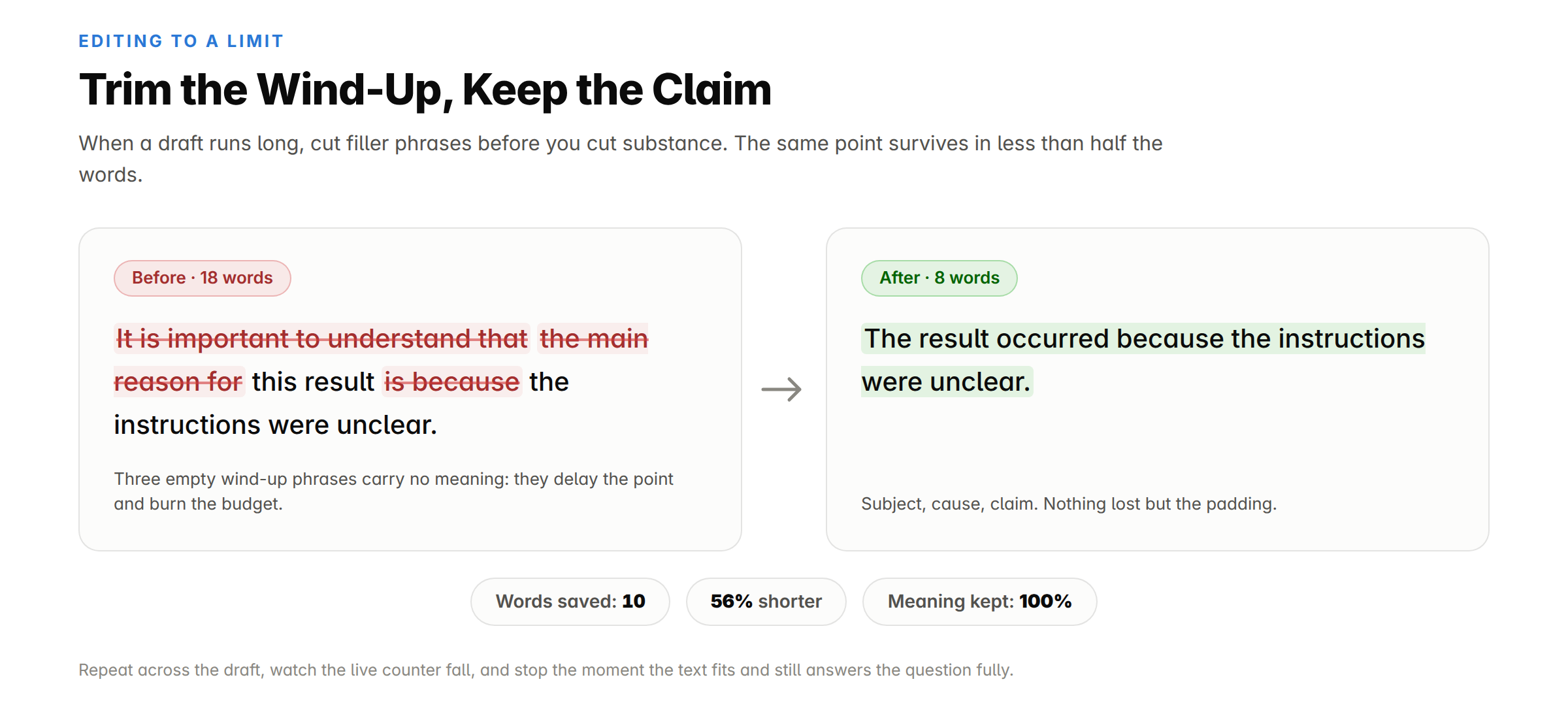
Same meaning, ten words saved. Repeat across the draft, watch the live counter tick down, and stop trimming the moment the essay fits and still answers the prompt fully. The readability score doubles as a bonus check: if your essay suddenly reads far above or below your natural voice, you've over-edited.
The COUNT Method: A Framework for Strict Limits
When a hard limit is involved (an application, a contest, a filing), use this five-step workflow:
C: Confirm the requirement. Find the maximum, minimum, permitted tolerance (often ±10%), and which sections are included.
O: Only count required text. Strip references, notes, captions, or headings if the instructions exclude them before you paste.
U: Use the live statistics. Monitor words, characters, paragraphs, and reading time while you revise, not just at the end.
N: Narrow or expand meaningfully. Cut repetition when long; add evidence, examples, or counterarguments when short. Never pad.
T: Test the final destination. Paste the finished version into the official submission field and confirm its count. Leave a 2–5% buffer under hard caps, because portals sometimes tokenize em dashes, URLs, or hyphens differently.
Which Metric Do You Actually Need? (Decision Guide)
Different tasks live and die by different numbers. Use this quick decision tree:
Is your limit set by a school, publisher, or application? → Use word count, and confirm which sections are included.
Is your limit set by a platform or form field (X, meta description, SMS, ads)? → Use characters with spaces.
Are you billing or being billed for translation/typesetting? → Confirm whether the contract uses source words, target words, or characters without spaces.
Are you preparing something to be spoken (talk, video, podcast)? → Use speaking time at ~130 wpm, then rehearse aloud.
Are you publishing web content for readers? → Use reading time, readability score, and paragraph/sentence counts together; total length alone tells you little.
Are you optimizing a page for search? → Use keyword density as an over-use alarm plus meta length checks; ignore any "ideal word count" myths.
Word Count Conversions: Pages, Reading Time, Speaking Time
These estimates assume ~500 words per single-spaced page, ~250 words per double-spaced page (12-pt font, one-inch margins), ~238 wpm silent reading, and ~130 wpm deliberate speaking.
Word count | Single-spaced pages | Double-spaced pages | Reading time | Speaking time |
|---|---|---|---|---|
100 | 0.2 | 0.4 | ~25 seconds | ~45 seconds |
250 | 0.5 | 1 | ~1 minute | ~2 minutes |
500 | 1 | 2 | ~2 minutes | ~4 minutes |
650 | 1.3 | 2.6 | ~2.5 minutes | ~5 minutes |
750 | 1.5 | 3 | ~3 minutes | ~6 minutes |
1,000 | 2 | 4 | ~4 minutes | ~8 minutes |
1,500 | 3 | 6 | ~6 minutes | ~12 minutes |
2,000 | 4 | 8 | ~8.5 minutes | ~15.5 minutes |
5,000 | 10 | 20 | ~21 minutes | ~38 minutes |
Layout changes (font, margins, spacing, headings) can shift page estimates substantially, which is exactly why word count, not page count, is the standard requirement in academia and publishing.
Best Use Cases: Who Uses a Word Counter and How
Students and academics. Essays, dissertations, abstracts, scholarship applications, and discussion posts nearly always carry strict limits, often with a ±10% tolerance. A live counter keeps you inside the band while editing, and paragraph/sentence stats flag overlong blocks. Never assume every section counts: follow your institution's rules on titles, citations, and references.
Bloggers, content writers, and SEO specialists. Compare drafts against briefs, add accurate "X min read" labels, keep keyword usage natural, and pre-check title tags (~50–60 characters) and meta descriptions (~155–160) before publishing. Remember: there is no universal SEO word count. A focused 800-word guide can outrank a repetitive 2,500-word article when it answers search intent better.
Social media managers and advertisers. Pre-flight copy against every platform's cap (280 characters on X, 2,200 on Instagram, 3,000 on LinkedIn, 30-character Google Ads headlines) using the characters-with-spaces figure.
Authors and novelists. Track daily output (a NaNoWriMo pace is 1,667 words/day), compare chapter lengths without relying on page counts, and check manuscripts against genre expectations (roughly 70,000–100,000 words for most adult novels).
Speakers, presenters, and video/podcast creators. Convert a script into minutes at ~130 wpm, trim a 12-minute draft into a 10-minute slot, then rehearse aloud; pauses, clips, audience reactions, and demonstrations all add time. At this pace: 650 words ≈ 5 minutes, 1,300 ≈ 10 minutes, 3,900 ≈ 30 minutes.
Editors and journalists. Compare drafts with publication limits, tighten flagged sections, and use character totals for headlines, decks, captions, and preview text.
Translators and localization teams. Per-word and per-character billing needs an independent, transparent count. Confirm whether the client counts source or target text, since totals can shift significantly between languages, and note that languages without consistent spaces need specialized segmentation.
Job seekers and professionals. Keep resumes, cover letters, LinkedIn summaries, executive summaries, and proposals tight and recruiter-friendly. Shorter isn't automatically better; include enough evidence while respecting the reader's time.
Legal and business professionals. Stay within filing limits, brief lengths, and clause constraints, and count confidential text safely in a tool that never uploads it.
Word Counters vs. Other Word-Counting Options
Feature | Word Counters | Microsoft Word / Google Docs | Grammarly counter | Basic online counters |
|---|---|---|---|---|
Price | Free, no premium gating | License / account required | Free tool; full product paid | Free (often ad-heavy) |
Sign-up required | No | Yes | Account for full features | Usually no |
Real-time counting | ✅ Instant | ✅ Status bar | ✅ | Varies |
Characters with & without spaces | ✅ Both at once | ⚠️ Buried in dialog | ⚠️ Limited | Sometimes |
Sentence & paragraph counts | ✅ | ⚠️ Buried in menus | ❌ | Varies |
Reading + speaking time | ✅ Both | ❌ | ❌ | Rarely both |
Readability scores (Flesch/F-K) | ✅ | ⚠️ Optional, hidden | ⚠️ Premium | Rarely |
Keyword density | ✅ | ❌ | ❌ | Rarely |
SEO meta-length checks | ✅ | ❌ | ❌ | ❌ |
Case converter | ✅ | ⚠️ Manual steps | ❌ | Rarely |
Canadian spelling support | ✅ | ⚠️ Region setting | ⚠️ Partial | ❌ |
File upload/download | ✅ | ✅ | ❌ | Sometimes |
Autosave | ✅ Local | ✅ Cloud | ❌ | Rarely |
Text stays in your browser | ✅ Never uploaded | ⚠️ Cloud-synced | ❌ Processed on servers | Often unclear |
Extra tools on the same site | 36 free tools | Full office suite | Grammar suite (paid) | Few |
The takeaway: word processors are built for writing, not checking; they're slow to open, hide statistics in menus, and can't measure keyword density or speaking time at all. Grammar platforms bundle a counter as a lead-in to a paid product. Basic counters vary wildly in features and privacy. A purpose-built tool combines instant counting, deep analytics, SEO helpers, and in-browser privacy on one free page. The one thing no analysis tool replaces is the submission portal itself: always verify the final count where it's enforced.
Why Word Counts Differ Between Tools (Troubleshooting Guide)
Two well-built counters can produce slightly different results without either being broken. Use this diagnostic table when totals don't match:
Symptom | Likely cause | Fix |
|---|---|---|
Off by a few words | Hyphenated compounds, em dashes, or standalone symbols tokenized differently | Leave a 2–5% buffer under hard limits |
Off by a lot in Word/Docs | Headers, footers, footnotes, or text boxes counted differently; Google Docs excludes headers, footers, and footnotes from its full-document count | Select only the body text, or paste just the body into the counter |
Pasted text counts oddly | Hidden formatting from a PDF or website: non-breaking spaces, soft hyphens, hidden line breaks, doubled spaces | Clean the text first (a Remove Extra Spaces tool helps), then recount |
URLs/emails inflate or deflate counts | Most counters treat an uninterrupted URL as one word; some portals split it | Verify in the destination portal |
Non-English text counts wrong | The language doesn't mark word boundaries with spaces (Chinese, Japanese, Thai) | Use a segmentation-aware tool, and treat the client's count as authoritative |
Numbers/decimals disputed | "3.14" is one token to most counters; some systems differ | Follow the destination's rule |
For any exact requirement: leave a small margin and confirm the final count in the official destination.
Pre-Submission Word Count Checklist
Run this 60-second checklist before you hit submit:
I know the exact limit and whether it's words or characters (with or without spaces)
I know which sections count (title, headings, citations, quotes, captions, references, appendices)
I pasted only the text that counts into the counter
I cleaned hidden formatting from any PDF or web-copied text
My final total sits 2–5% under any hard maximum
I trimmed repetition rather than substance (or added evidence rather than filler)
Readability and paragraph structure still suit my audience
I verified the count in the destination portal or platform, the number that actually decides acceptance
I saved a copy of the final version outside the browser
Tips and Best Practices
Match the metric to the requirement. Words vs. characters-with-spaces vs. characters-without-spaces: trimming against the wrong one wastes effort.
Aim slightly under hard caps. Portals and ad platforms sometimes tokenize em dashes, URLs, or hyphens differently than your editor. Landing 2–5% under avoids submission-day surprises.
Trim, don't pad. Over the limit? Cut filler ("very," "really," "in order to," "it is important to note that") before cutting substance. Under it? Add an example, a counterargument, or a deeper explanation; markers and readers can tell the difference between substance and stuffing.
Use reading time as an editing signal. If your "quick update" email shows a 4-minute reading time, it isn't a quick update. Cut until the estimate matches the reader's expectation.
Pair word count with readability. Hitting 2,000 words means little if the text reads at a postgraduate level for a general audience. Aim for Flesch Reading Ease 60–70 for most web content; technical audiences tolerate lower.
Treat keyword density as a smoke alarm, not a target. Around 1–2% for a primary keyword is a reasonable sanity check; if a term climbs toward 3%+, swap in synonyms. Never repeat a keyword just to reach a percentage; modern search engines reward natural language.
Fix structure with the per-unit counts. A 500-word paragraph or a 60-word sentence is a scanning problem regardless of the total. Use sentence and paragraph counts to find and break them up.
Rehearse spoken content aloud. A speaking-time estimate can't predict pauses, audience interaction, or delivery style. Record or rehearse the final script before you trust the number.
Keep private text private. For contracts, medical text, or unpublished work, use a counter that processes text in-browser and never uploads it.
Recheck after every editing pass. One small change ripples through words, characters, sentences, reading time, and density. Always check the complete final version, and keep a backup outside the browser.
A word counter should do more than display one number. The count gets you inside the limit; the metrics around it (reading time, speaking time, readability, keyword density, structure stats) make the writing itself better. That's the difference between a basic counter and a writing dashboard.
The free Word Counter puts all of it on one fast, private, browser-based page: live word and character totals, sentence and paragraph analysis, time estimates, readability and keyword data, Canadian spelling support, and file tools, with no sign-up, no download, and no text ever leaving your device.
Try it now: paste your draft, check the metrics that matter to your task, revise with purpose, run the pre-submission checklist, and confirm the final count where it's enforced. Bookmark the tab and never guess your word count again.
Ideal Content Length for SEO
(Average Word Count of Top Ranking Pages)
Readability Score
(Flesch Reading Ease)
A readability score between 60–70
is considered easy to read.
Content Elements Overview
Breakdown of key elements in your text.
Frequently Asked Questions
Click any question to read the answer.
What is a word counter?
A word counter is a free online tool that counts the words, characters, sentences, and paragraphs in a piece of text. Advanced counters like WordCounters.ca also calculate reading time, speaking time, syllables, keyword density, and readability scores. Paste or type your text and every total appears instantly.
How do I count the words in my text?
Open WordCounters.ca, then type, paste, or upload your text. The word count updates in real time as you edit, with no button to press, nothing to install, and no sign-up.
How accurate is an online word counter?
Highly accurate for ordinary prose in space-delimited languages, and results generally match Microsoft Word and Google Docs. Tiny differences can appear with hyphenated compounds, em dashes, URLs, standalone symbols, footnotes, or languages that don't separate words with spaces. Against a hard limit, leave a small buffer and verify in the destination.
How does a word counter define a "word"?
Any uninterrupted run of characters separated by spaces, tabs, or line breaks. So state-of-the-art counts as one word, 2026 counts as one word, and a counts the same as extraordinarily. Attached punctuation adds characters but not words.
Do contractions and hyphenated words count as one word or two?
Contractions (don't, can't, they're) count as one word because they contain no space. Hyphenated terms without surrounding spaces (well-known) also count as one; well known counts as two. Institutional rules can differ, so follow the required counting method when one is specified.
Why is my word count different in Microsoft Word or Google Docs?
The applications treat hyphens, symbols, text boxes, headers, footers, and footnotes differently, and hidden formatting copied from PDFs or websites can change how text splits. Google Docs' full-document count excludes headers, footers, and footnotes unless you select that text. For ordinary body prose, totals should be identical or within a few words.
What's the difference between a word count and a character count?
A word count tallies whole words; a character count tallies letters, numbers, spaces, punctuation, and symbols. Essays and manuscripts use word limits; tweets, ads, meta descriptions, SMS, and form fields use character limits. "With spaces" is what most public platforms enforce; "without spaces" is common in translation billing.
How long does it take to read or speak 1,000 words?
About 4 minutes to read silently (~238 words per minute for non-fiction) and about 8 minutes to deliver aloud at a natural presentation pace (~130 words per minute). Your actual times vary with complexity, pauses, and delivery style.
How many words is a 5-minute speech?
About 650 words at a natural presentation pace of ~130 words per minute (a comfortable range is 600–750). Paste your script into a word counter with speaking-time estimates to see the projected duration, then rehearse aloud to confirm.
How many words should a blog post be for SEO?
There's no magic number; Google ranks pages on usefulness, not length, and publishes no ideal word count. Competitive informational posts commonly run 1,000–2,500+ words because thorough coverage requires it, but a focused 800-word guide can outrank a padded 2,500-word article. Match or exceed the depth of what already ranks; never pad to a number.
What is keyword density and what's a good percentage?
Keyword density is how often a term appears as a percentage of total words (uses ÷ total × 100). Roughly 1–2% for a primary keyword is a reasonable sanity check; the real purpose is catching over-use before it reads as keyword stuffing. Write for humans first.
What is a good Flesch Reading Ease score?
For general web content, aim for 60–70, which is plain English readable by 13- to 15-year-olds (roughly Grade 7–9). Below 50 reads as difficult; above 80 reads as very easy. Technical and academic audiences tolerate lower scores.
Do essay titles, citations, and references count toward the word limit?
There's no universal rule. Many universities count body text and headings but exclude reference lists and appendices; others differ. Check the brief or ask the instructor, then paste only the sections that count; the counter measures everything you give it.
Is it safe to paste confidential text into an online word counter?
It depends on the tool. Word Counters processes everything in your browser with JavaScript; your text is never uploaded, stored, or sent to a server, and the page keeps working offline once loaded. With other tools, check the privacy policy before pasting sensitive material. As a general habit, never paste passwords or private identification details into any online editor.
Is Word Counters free, and does it work on mobile?
Yes on both counts. The word counter and all 36 tools on the site are completely free with no account, no usage limits, and no premium tier. The site is fully responsive and works in any modern browser on phones, tablets, and desktops.
Can I count words in a file without copying and pasting?
Yes. Use the Upload button to load a text file directly into the editor for instant analysis, then download the edited version when you're done.
Does the tool support Canadian spelling?
Yes. The spelling scan flags American variants (color, center, labor) so you can maintain consistent Canadian spelling (colour, centre, labour), which is especially useful for Canadian students, businesses, government writing, and publications.